Overview
For Switchgrass, I wanted to use a simple, sector-based approach to represent a model of the track for our AI-driven friends (or enemies) to follow.
As I was designing both the racetrack and the AI, I had a fair bit of control over the entire process. For the AI implementation, I first skimmed my copy of Game AI Pro (I’d been gifted the harcover versions by my old professor!!), specifically the overview on Racing AI Architecture which gave me a good starting point for this project.
After some light reading and exploring a few common solutions, I settled on the following constraints:
- 2D Track Representation: simplifies math required while sufficient for my racetrack
- Piecewise-Linear Racing Line: this gave good results, partly due to the way AI forces were being applied
- Player-based Learning: I wanted to leverage a Player’s ‘run’ data to find an optimal line
- Simple Editor Tooling: my racetrack was still in progress and I needed to be able to make changes
Racetrack Representation
Here’s what the track representation I ended up using looks like in practice. For simpilicity’s sake, this only covers the primary path (so no shortcuts!) and also visualizes the optimal racing line generated from my personal runs.
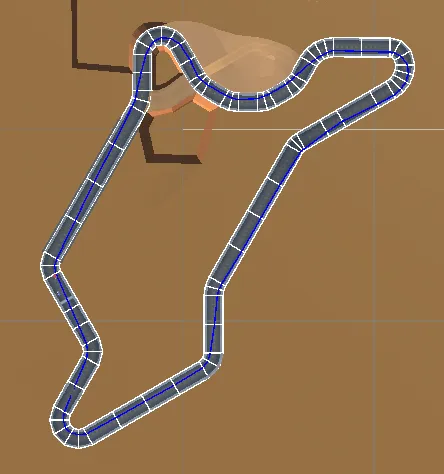 Sectors are outlined in white, with the blue racing line overlaid.
Note that the physical (mesh) track and logical racetrack used by AI are separate but overlaid. This is to achieve maximum control without having to rely on complex face-tagging systems and also being independent of mesh density.
TrackNode
A TrackNode consists of a single ‘node’ of the track. It stores a width and the point of the ‘racing line’ on it.
public class TrackNode : MonoBehaviour
{
    public float width = 10;
    [Range(-1, 1)] public float racingLine;
    public TrackNode next;
    public TrackNode prev;
}
This component is assigned to GameObjects and their Transforms are used to represent the Track.
TrackNodes form a doubly-linked list and include utilities to calculate length recursively, and 2D point-in-Quad testing.
EDIT (2025-02-13): Linked Lists Galore
As I was editing this article to add support for an ordered sequence of articles (see links at the bottom of this page), I used a similar approach to represent this relation:
interface ArticleSchema {
    // ...
    prevArticle?: string; // slug of the previous article
    nextArticle?: string; // slug of the next article
}
Linked lists are really neat in this aspect, and they’ve saved me more than once in a pinch.
Calculate Track Length
I wanted to dynamically calculate track length so I had greater flexibility with shortcuts later, as well as to avoid accidentally using old, invalid data.
public void CalculateLength()
{
    // Start Node
    if (prev is null)
    {
        length = 0;
        return;
    }

    // Need to (re)calculate the length of previous nodes
    if (prev.length < 0)
    {
        prev.CalculateLength();
    }

    var toPrev = Vector3.Distance(GetRacingLinePoint(), prev.GetRacingLinePoint());
    length = prev.length + toPrev;
}
The member variable length was initialized to -1 and updated as necessary.
The performance-junkies among you may grumble, since this is obviously inferior to a linear approach and could exceed the maximum stack depth on sufficiently complicated tracks. As someone who also enjoys pushing hardware and tools to their limit, these are valid complaints.
For this prototype, however, I chose to use it regardless due to the ease of use, especially trivial track modifications and having shortcuts that ‘just work’. Also, since the racing line could be player-defined, via tracking a ‘run’, this recursive approach gave me good results.
Sectors
A ‘Sector’ is defined as the area between the current TrackNode and the previous one. To track which sector an AI racer (or the Player) was in, I used a simple point in quad check.
For this simple approach to work, however, meant track sectors (the space between two consecutive TrackNodes) were limited to being convex. This was fine, as concave track sectors would provide subpar results for AI steering logic, anyway.
public bool SectorContains(Vector3 testPosition)
{
    // Get corner points (top left, top right, bottom left, bottom right) and test point in 2D
    ....

    // Calculate edge vectors
    var left = tl2D - bl2D;
    var right = tr2D - br2D;
    var top = tr2D - tl2D;
    var bottom = br2D - bl2D;

    // Bounds check using 2D 'Cross' (Wedge) product
    return left.Cross(test2D - bl2D) < 0
            && right.Cross(test2D - tr2D) > 0
            && top.Cross(test2D - tr2D) < 0
            && bottom.Cross(test2D - br2D) > 0;
}
Alternate Paths and Shortcuts
To implement ‘fairer’ AI behaviour, I used the simplest trick in the book — a railroad-lever style shortcut. This is only activated when the Player has a sufficient lead, ensuring fairer-feeling gameplay. Since the AI was trained on player runs (mine, in particular), it was a fairly fearsome opponent.
Branched Track Node
A variant of TrackNode that holds both a ‘normal’ and ‘alternate’ next node. The next node can then be toggled on-demand.
public override bool TryGetNextNode(out TrackNode nextNode)
{
    if (!_useAlternate || alternate is null)
    {
        return base.TryGetNextNode(out nextNode);
    }

    nextNode = alternate;
    return true;
}
Other than some helpful gizmo overrides, it was fairly simple.
Probabilistic Track Node
I also wanted to support a ‘failure’ path, since the payoff from the shortcut was too good, this would make it a more high-risk situation.
This was simply a BranchedTrackNode with fuzzy logic. Uses a simple cutoff to decide whether to use the regular or alternate next node.
public override bool TryGetNextNode(out TrackNode nextNode)
{
    // When asked for the next node, pick either the 'regular' one or alternate, based on a set probability.
    SetUseAlternate(Random.value < alternateProbability);
    return base.TryGetNextNode(out nextNode);
}
Editor Tooling
A combination of vertex snapping and custom editor tooling made setting up this track relatively easy.
The Track Node Editor tool has the following:
- Extend the track by holding
Eat the end node - Insert a node between two selected nodes by pressing
I.
To make development easier, I bound this tool to the T key (if a TrackNode was selected).
Closing Thoughts
I enjoyed dipping my toes into racetrack-representation, and it serves as a possible precursor to my eventual Burnout 3: Takedown inspired spiritual successor. The decision to spend some time making a simple editor tool paid off, and it’s something I plan to do a lot more of in the future.

As you can see, we have a fair bit to implement in order to actually have our AI drivers do more than do donuts. I plan to write a third (and final?) post to complete this series.
Until then,
Ciao.
References
- G. Biasillo. “Representing a race track for AI.” In AI Game Programming Wisdom, edited by Steve Rabin
- Simon Tomlinson and Nic Melder. “An Architecture Overview for AI in Racing Games.” In Game AI Pro, edited by Steve Rabin